Serving Local LLMs with llama.cpp, Docker, and OpenCode on an RTX 5060 Ti
Serving Local LLMs with llama.cpp, Docker, and OpenCode
This post documents setting up a local LLM inference server on my Linux desktop (RTX 5060 Ti, 16GB VRAM), reusing models already downloaded through LM Studio, and wiring it into OpenCode for agentic coding work. This was done using Claude under human supervision, both the experiment and this blog post, as part of my personal training in using AI.
Architecture Overview
The setup consists of:
- llama.cpp server: running in Docker (
ghcr.io/ggml-org/llama.cpp:full-cuda) with full GPU offload - Model storage: GGUF files downloaded via LM Studio, mounted read-only into the container rather than re-downloaded
- MTP speculative decoding: a small draft model paired with the main model to speed up generation
- OpenCode: configured as an OpenAI-compatible client against the local server
Why llama.cpp over vLLM
I initially explored vLLM, which is the better choice for serving multiple concurrent users, as PagedAttention and continuous batching give it a large throughput advantage under concurrency. But for a single-user desktop setup, that advantage mostly disappears, and llama.cpp won on the things that actually mattered here:
- New model architectures land in llama.cpp/GGUF support faster. I hit this directly: a Qwen3.6 MoE GGUF loaded fine in LM Studio the same day it was released, while vLLM’s out-of-tree GGUF plugin (
vllm-gguf-plugin) failed withUnknown gguf model_type: qwen3_5_moe, the architecture mapping simply hadn’t been added yet. - GGUF is llama.cpp’s native format; in vLLM it’s an experimental, bolted-on plugin.
- Simpler partial/full GPU offload story for a single 16GB card.
Reusing LM Studio’s Downloads
LM Studio stores models on disk mirroring the Hugging Face repo layout:
~/.lmstudio/models/<publisher>/<model-name>/model-file.gguf
Rather than downloading the same weights again for a server setup, I mounted that folder straight into the container:
docker run --rm -it --gpus all \
  -v ~/.lmstudio/models/lmstudio-community:/models \
  -p 8080:8080 \
  ghcr.io/ggml-org/llama.cpp:server-cuda \
  -m /models/gemma-4-12B-it-QAT-GGUF/gemma-4-12B-it-QAT-Q4_0.gguf \
  --port 8080 --host 0.0.0.0 --n-gpu-layers 1
Wiring into OpenCode
OpenCode talks to any OpenAI-compatible endpoint via a custom provider block in opencode.json:
{
  "$schema": "https://opencode.ai/config.json",
  "provider": {
    "llama-local": {
      "name": "llama.cpp (local)",
      "npm": "@ai-sdk/openai-compatible",
      "options": {
        "baseURL": "http://127.0.0.1:8080/v1"
      },
      "models": {
        "local-model": {
          "name": "Local model"
        }
      }
    }
  }
}
Since llama.cpp only ever serves one model at a time and doesn’t validate the "model" field on incoming requests, a generic alias like local-model works regardless of which GGUF is actually loaded in the container. Swap the model, restart the container, and OpenCode keeps working without touching the config again.
Testing with OpenCode
As a test example, I asked OpenCode to write a shell script to run the docker container for llama. The prompt was:
create a shell script to run llama.cpp in a docker container an example invocation is docker run --rm -it --gpus all -v ~/.lmstudio/models/lmstudio-community/:/models -p 8080:8080 ghcr.io/ggml-org/llama.cpp:server-cuda -m /models/gemma-4-12B-it-QAT-GGUF/gemma-4-12B-it-QAT-Q4_0.gguf --port 8080 --host 0.0.0.0 -n 512 --n-gpu-layers 1
It did exactly what I asked, and wrote a very simple bash script:
#!/bin/bash
# Docker run command to start llama.cpp server
docker run --rm -it --gpus all \
  -v ~/.lmstudio/models/lmstudio-community/:/models \
  -p 8080:8080 \
  ghcr.io/ggml-org/llama.cpp:server-cuda \
  -m /models/gemma-4-12B-it-QAT-GGUF/gemma-4-12B-it-QAT-Q4_0.gguf \
  --port 8080 \
  --host 0.0.0.0 \
  -n 512 \
  --n-gpu-layers 1
It took about 9 minutes.
Then I asked to update the script to allow selecting the model:
use fzf to allow selecting a model from the directory ~/.lmstudio/models/lmstudio-community before running docker
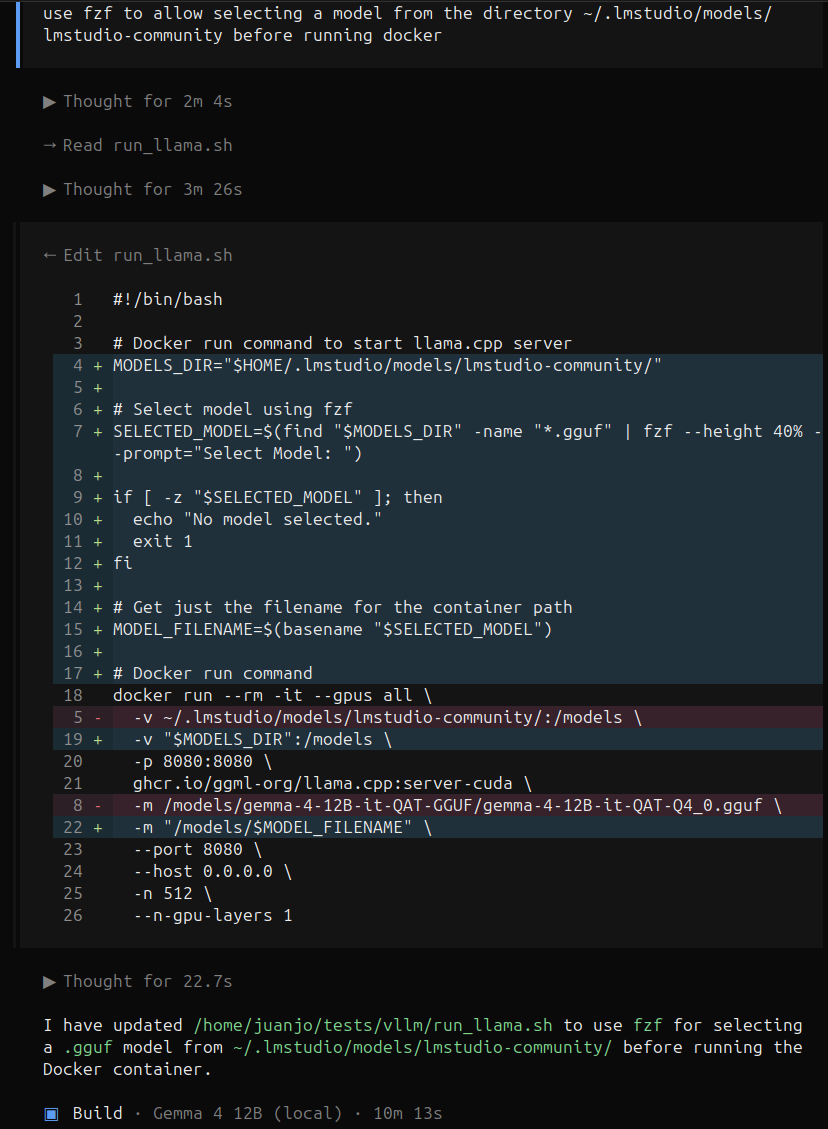
It took about 10 minutes, the speed was 2 tokens per second:
22.45.932.052 I slot print_timing: id  3 | task 893 | prompt eval time =    3038.71 ms /    46 tokens (   66.06 ms per token,    15.14 tokens per second)
22.45.932.056 I slot print_timing: id  3 | task 893 |        eval time =  284045.06 ms /   624 tokens (  455.20 ms per token,     2.20 tokens per second)
And it was not working because the complete path to the model wasn’t included in the command.
I Asked Claude about this, and it rapidly discovered the issue, after providing the nvidia-smi output and the command.
Pitfall #1: --n-gpu-layers defaulting too low
My first run used --n-gpu-layers 1, as depicted in [https://github.com/ggml-org/llama.cpp/blob/master/docs/docker.md#usage-1](llama.cpp documentation), which offloads a single transformer layer to the GPU and leaves the rest on CPU. nvidia-smi showed the giveaway: only ~1.8GB of VRAM used and 5% GPU utilization, when a 12B Q4 model should use roughly 7-8GB just for weights.
Solution: set --n-gpu-layers 999. llama.cpp clamps it to the model’s actual layer count, so this is the standard way to say “offload everything” without needing to know the exact layer count per model.
I’ve fixed the command, and launched it again. On OpenCode, I asked it to review the script I fixed. In the attempt to add fzf, it took 3m 26s to read the simpler run_llama.sh file, now, despite having included fzf and some logic, doubling the file size, it took only 7.7s, and provided a meaningul analysis on 22.9s.
I've done changes to the script evaluate them
The script looks good with the added functionality, but there is a potential issue with how MODEL_FILENAME is constructed on line 18:
MODEL_FILENAME=$(basename $(dirname "$SELECTED_MODEL"))/$(basename "$SELECTED_MODEL")
Since you are mounting MODELS_DIR (which ends in lmstudio-community/) to /models, the path inside the container will already be relative to that directory.
For example, if you select /home/user/.lmstudio/models/lmstudio-community/my_model.gguf:
-
dirname is .../lmstudio-community
-
basename of that is lmstudio-community
-
MODEL_FILENAME becomes lmstudio-community/my_model.gguf
-
The docker command becomes -m "/models/lmstudio-community/my_model.gguf"
This might result in a path like /models/lmstudio-community/lmstudio-community/my_model.gguf inside the container. You likely only need:
MODEL_FILENAME=$(basename "$SELECTED_MODEL")
▣  Build · Gemma 4 12B (local) · 22.9s
Then we chatted about the need of including the full path to in the call, at it came with better solution in about a minute. This time the model’s output speed was about 70t/s.
Then I came back to Claude to further discuss performance improvements.
Performance Tuning
Once offload was fixed, a baseline llama-bench run on the RTX 5060 Ti gave:
docker run --rm -it --gpus all -v ~/.lmstudio/models/lmstudio-community:/models \
  --entrypoint llama-bench \
  ghcr.io/ggml-org/llama.cpp:full-cuda \
    -m /models/gemma-4-12B-it-QAT-GGUF/gemma-4-12B-it-QAT-Q4_0.gguf \
    -ngl 999
| model | size | params | backend | ngl | test | t/s |
|---|---|---|---|---|---|---|
| gemma4 ?B Q4_0 | 6.48 GiB | 11.91 B | CUDA | 999 | pp512 | 2252.53 ± 101.21 |
| gemma4 ?B Q4_0 | 6.48 GiB | 11.91 B | CUDA | 999 | tg128 | 50.52 ± 0.21 |
~50 tok/s generation with the model comfortably fitting in 16GB, leaving headroom for a large context window.
From there, a few flags stacked together for further gains:
llama-server -m /models/gemma-4-12B-it-QAT-GGUF/gemma-4-12B-it-QAT-Q4_0.gguf \
  --model-draft /models/gemma-4-12B-it-QAT-GGUF/mtp-gemma-4-12B-it-Q8_0.gguf \
  --spec-type draft-mtp --spec-draft-n-max 4 \
  --n-gpu-layers 999 -fa on \
  --cache-reuse 256 \
  --cache-type-k q8_0 --cache-type-v q8_0 \
  --port 8080 --host 0.0.0.0
-fa on(flash attention): a free efficiency win, no quality tradeoff.--cache-reuse 256: reuses KV cache across requests sharing a prefix — valuable for agentic tools like OpenCode that resend a growing conversation history each turn.--cache-type-k/--cache-type-v q8_0: quantized KV cache, trading a small amount of precision for more headroom and slightly less memory bandwidth pressure at longer context.- MTP speculative decoding: the biggest win by far (see below).
MTP Speculative Decoding
This particular Gemma 4 GGUF repo ships a small “draft” model (mtp-gemma-4-12B-it-Q8_0.gguf) that predicts several tokens ahead; the full model just verifies them in a single pass instead of generating token-by-token. Output is identical to running without it, every drafted token is checked against the real model, so this is a pure speed optimization, not an approximation.
Pitfall #2: missing the multimodal projector for the draft model
The same model folder also contains a mmproj-gemma-4-12B-it-QAT-BF16.gguf file. That’s unrelated, it’s a multimodal projector that lets the model accept image input, not a speculative decoding drafter. The actual MTP file had to be downloaded separately from the repo’s MTP/ subfolder.
wget -P ~/.lmstudio/models/lmstudio-community/gemma-4-12B-it-QAT-GGUF/ \
  https://huggingface.co/unsloth/gemma-4-12B-it-qat-GGUF/resolve/main/MTP/mtp-gemma-4-12B-it-Q8_0.gguf
Real server logs from OpenCode-driven sessions after enabling MTP:
task 0  | draft acceptance = 0.766 ( 95 accepted / 124 generated), mean len = 4.06 | eval: 84.06 tok/s
task 43 | draft acceptance = 0.984 ( 63 accepted /  64 generated), mean len = 4.94 | eval: 97.51 tok/s
task 63 | draft acceptance = 0.958 ( 23 accepted /  24 generated), mean len = 4.83 | eval: 98.79 tok/s
Draft acceptance in the 76-98% range, generation landing around 84-99 tok/s, roughly a 1.7-2x real-world improvement over the ~50 tok/s baseline. graphs reused climbing across requests (31 → 45 → 50) and high LCP-similarity matches on later tasks also confirmed --cache-reuse was doing its job, avoiding reprocessing the shared conversation prefix on each turn.
Verification
# Confirm GPU offload is actually happening
nvidia-smi
# Should show several GB of VRAM used and high GPU-Util during generation, not ~1.8GB / 5%

# Confirm the endpoint is reachable and check the exact model id
curl http://127.0.0.1:8080/v1/models

# Real throughput numbers for your exact hardware/build
docker exec -it llama llama-bench -m /models/<path-to-gguf> -ngl 999
Key Lessons Learned
--n-gpu-layerssilently defaults low, always double-checknvidia-smishows meaningful VRAM usage and utilization after starting the server, don’t assume a flag was respected.- Reusing already-downloaded weights is straightforward, LM Studio’s on-disk layout mirrors Hugging Face repos closely enough that other tools can point straight at the same files, no re-download needed.
- New architectures reach llama.cpp/GGUF faster than vLLM’s GGUF plugin, worth checking before assuming vLLM is the more “production-grade” choice for a given model.
- MTP is close to a free lunch, same output, meaningfully faster generation, as long as the model ships a compatible drafter and the llama.cpp build is recent enough to support it.
--cache-reusematters specifically for agentic tools, OpenCode-style clients resend growing conversation history every turn, so avoiding reprocessing the shared prefix has an outsized effect on perceived responsiveness.
Conclusion
Between full GPU offload, flash attention, KV cache reuse, and MTP speculative decoding, generation speed on the RTX 5060 Ti roughly doubled over the naive baseline, all while reusing model weights already sitting on disk from LM Studio. For a single-user desktop setup like this, llama.cpp’s simplicity and fast-moving GGUF support ended up mattering more than vLLM’s concurrency-oriented architecture.
As with previous posts, I’m still struck by how much faster this kind of troubleshooting goes with an AI assistant in the loop, not just for the commands themselves, but for understanding why something like draft acceptance or graphs reused in a log line actually matters.